Calendar feeds & cloud calendars
Subscribe to external calendars (Apple iCloud, Google Calendar, Outlook or an .ics URL) and show their events as coloured blockers.
Overview
Via the feed manager in the calendar (Training → Calendar) you subscribe to external calendars per trainer or location. Their events appear as read-only, coloured blockers in all calendars – so you avoid double bookings with private or work appointments. You can connect Apple iCloud (via CalDAV), Google Calendar, Outlook or any public .ics address.
Add a feed
In the Add feed area you create a new subscription:
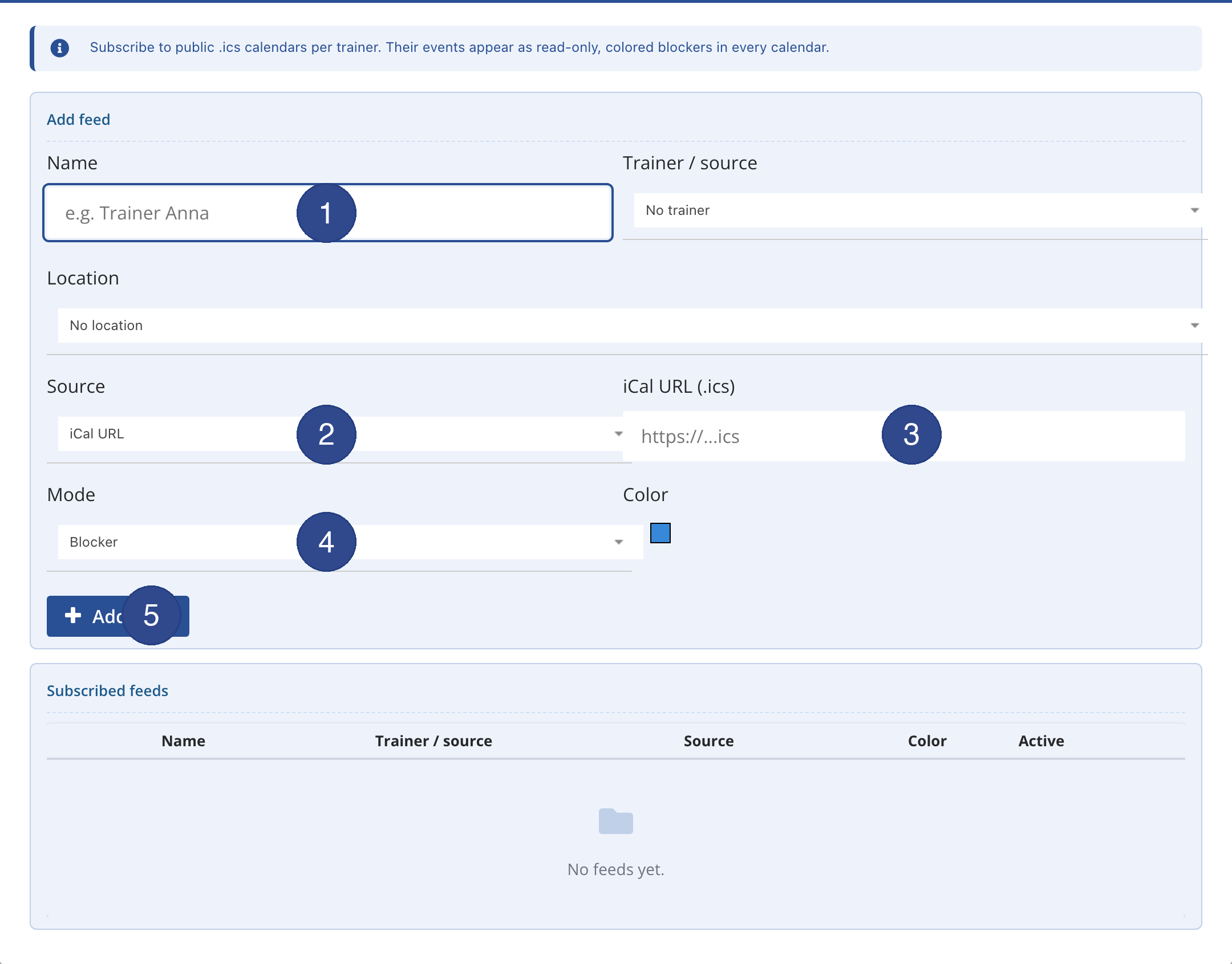
Via Trainer / source and Location you assign the feed, via Colour you set its appearance. Created subscriptions appear below under Subscribed feeds and can be activated or deleted there.
Connecting sources
For the Apple iCloud calendar, CalDAV is used with an app-specific password – the normal Apple ID password is never transmitted to spooorts. You connect Google Calendar and Outlook via an account sign-in (OAuth). A simple .ics URL is enough for publicly shared calendars. After connecting, the external events are synchronised regularly and shown as blockers in the spooorts calendar. As the blockers are read-only, they cannot be changed accidentally in the spooorts calendar.